Open with the promise, not the CV. "In 90 minutes you will
have an AI agent running on a public URL, for free, that doesn't
time out."
Ask for a show of hands:
who has deployed anything to the internet before? That
tells you how much to slow down.
Press T now to start the session timer. Check the on-pace
number every divider slide.
About me
Dileepa Bandara
Associate AI Engineer at Random Software Ltd · Sri
Lanka
I'm an AI Engineer passionate about building intelligent solutions
that make a difference.
What I work on
AI agents, LLM apps, MCP integrations
Cloud and backend systems on Azure
Python, TypeScript, FastAPI, NestJS
Community
Organizing committee, AI Community Sri Lanka
Microsoft Student Ambassador (Gold, alumni)
Workshops on agents and Microsoft Foundry
Background
BSc (Hons) Computing, Coventry University
HND Software Engineering, NIBM
Writing and videos at dileepa.dev
Thirty seconds, tops. They came for the agent, not the CV —
say who you are, why you've hit this problem, and move on.
The one line that earns attention:
"I ship these for a living, and this timeout wall is the thing
that broke every one of my first demos."
What you'll walk out with
You build
A deployed agent on your own public URL
A UI that shows "Agent is searching…" live
Your API keys safely out of GitHub
You learn
Why agents break normal web hosting
The one pattern that fixes it
What free tiers actually cost you
No AI, cloud, or DevOps experience assumed. If you can write a
little Python, you can do all of this.
Say explicitly:
everything today is free, no credit card, ever. That
removes a real anxiety for students.
Mention the repo README redoes the whole thing — so nobody has to
panic-type.
The next 90 minutes
Ten seconds, not a minute. "Theory for the first half, then
we deploy something real. The deploy is the point — everything
before it exists to make it make sense."
Name the shape out loud:
here is the wall → here is the pattern around it → here it is
running live.
Press A from anywhere to come back to this slide — useful
after a question drags you sideways. The block you were in is
marked with a dot.
Rows are clickable if someone asks "will you cover X?" — jump
there, show it, jump back.
If you remember one thing
Never run the agent inside the HTTP request.
Plant it now, prove it later. Say it, let it sit for three
seconds, move on. It comes back at the end.
Don't explain it yet. Right now it should sound slightly cryptic —
that's what makes slide 14 land.
What we're building
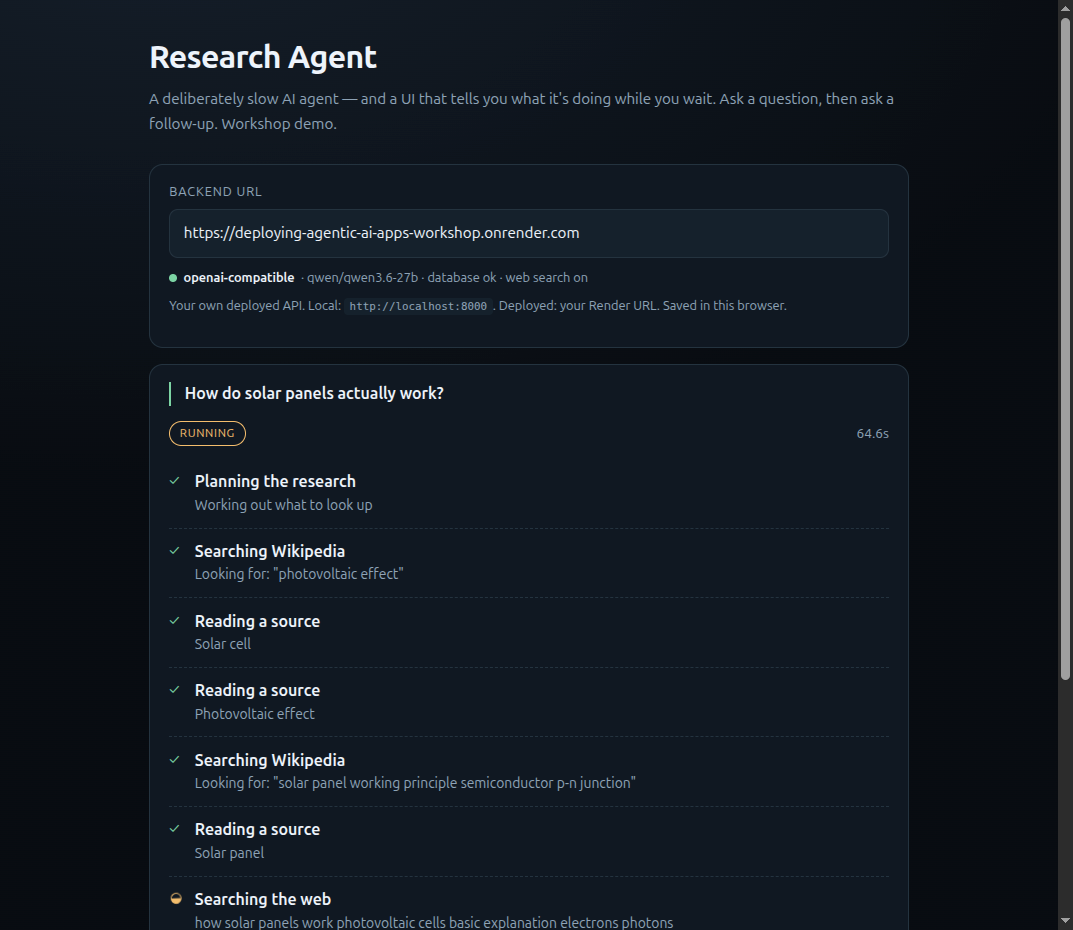
A research agent. You ask a question. It plans,
searches, reads sources, writes an answer, and saves it. Then you
ask a follow-up and it remembers.
It takes 30–60 seconds. That's deliberate — it's slow
enough that the naive version visibly breaks.
Gemini · FastAPI on Render · Postgres on Supabase · React client
on GitHub Pages. Total cost: $0.
Show the destination first. People follow a talk far better
once they know where it ends.
If the live demo is warm, run it here for 20 seconds instead of
showing the screenshot. Nothing beats the real thing.
Don't explain the memory or the web search yet — just let them see
a follow-up question work. Both get their own slide later,
and the curiosity is worth more than the explanation right now.
01
The wall
Why your agent dies the moment you deploy it.
Target: minute 5. Check the timer.
Generative vs Agentic
Generative — a chatbot
prompt→answer1 API call · ~2 seconds
Agentic — an agent
prompt→think→tool→observe→think→tool→answer
8 API calls · ~45 seconds · any step can fail
Define tool plainly: "a normal function the model is
allowed to call — search the web, query a database, send an
email."
The loop is the whole difference. Generative answers once.
Agentic answers, checks its work, and goes again.
So what actually changes?
⏱ Duration
Seconds → minutes. Web servers are built for
requests that finish fast.
💥 Failure
"Bad answer" → half-finished job. It failed on
step 4 of 7. Now what?
👀 The user
Staring at a blank screen for 45 seconds,
wondering if it's broken.
Three different problems. All three are solved by the same
architectural decision.
The third one is the one students underrate.
A working agent with no progress UI is indistinguishable from a
broken one.
Judges will not wait.
The Timeout Trap
Your agent runs beautifully on localhost, because
nothing between you and the server is impatient.
Deployed, there's a
proxy, a load balancer, a gateway, a CDN — and
every one of them has an opinion about how long a request may
take.
One of them gives up before your agent does.
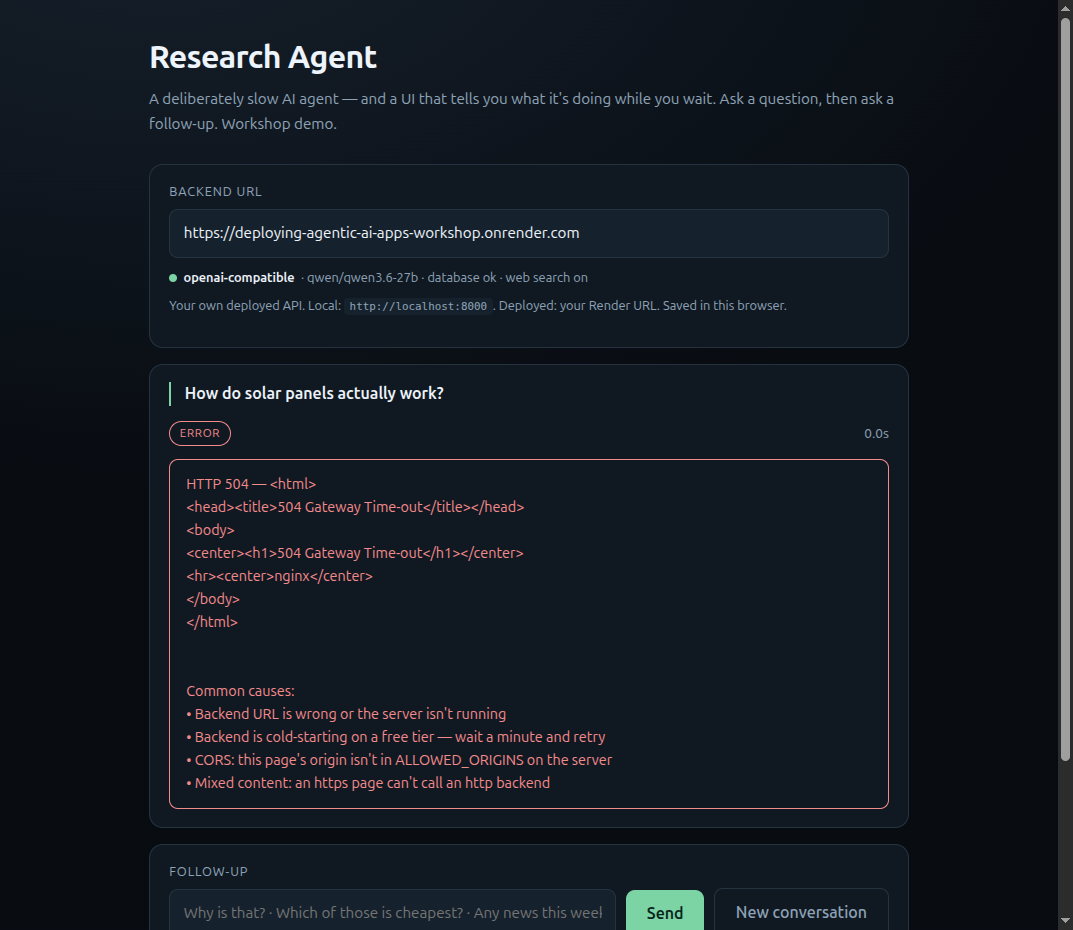
Do the live version here if you can: tick "Naive mode" in
the demo UI and hit ask. Let the room watch a spinner do nothing.
Don't fill the silence — the discomfort is the point.
Then say: "the work may have actually completed. The user will
never know."
"Just raise the timeout"
You can, a bit. It doesn't fix anything.
You're renting a request for 5 minutes to do 5
minutes of work — one of the most expensive ways to buy compute.
You don't control the whole chain. A proxy, a
corporate firewall, or a phone switching from Wi-Fi to mobile data
still cuts it.
The user still gets nothing until the end — no
progress, no partial results, no way to resume.
A crash loses everything. No record of how far it
got.
Raising the timeout doesn't remove the wall. It moves it further
away.
Someone will ask about specific platform limits. Deflect to
the principle:
every host has some request-scoped limit, and it's the wrong
place to put long work regardless of the number.
Avoid quoting exact free-tier timeout numbers on stage — they
change monthly and someone in the room will have newer information
than you.
The 100% free stack
CLIENTReact + Vite — GitHub Pages or
Vercelfree
APIFastAPI (Python) — Render web servicefree tier
MODELGemini via Google AI Studiofree tier
DATAPostgres + pgvector — Supabasefree tier
SEARCHWeb search over MCP — Tavily(optional)free tier
Five boxes. No credit card at any point. This is a real
submission-grade stack, not a toy.
Name the swap-ins so nobody feels locked in: Hugging Face Spaces
or Fly.io instead of Render; Groq or OpenRouter instead of Gemini;
Neon instead of Supabase.
The architecture is the transferable part.
Search is the only optional box — leave the Tavily key out
and the agent researches with Wikipedia alone. Say so, or someone
will think they're missing a required signup.
Speed vs volume
Free tiers limit you two different ways, and picking the wrong one for
an agent hurts.
Limits per minute
Best for
Groq
generous requests, tight
tokens
short, very fast turns
Gemini
tighter requests, generous
tokens
long agent loops
An agent re-sends its whole context — system
prompt, tool definitions, full history — on
every single turn. Five turns can burn a token-per-minute
budget that a chatbot would never touch.
Exact numbers move every few months — check both providers on the
session morning. docs/free-tier-notes.md lists where to
look; the shape of the trade-off above outlasts the digits.
This is the slide most of the room won't have thought about.
Requests-per-minute is the obvious limit; tokens-per-minute is
the one that actually stops agents.
Concrete framing: "a chatbot sends 200 tokens per call. Your agent
sends 4,000, five times, in one run."
The honest slide
Free tier isn't a smaller paid tier. It's a different set of
trade-offs.
Your server sleeps. First request after idle
takes ~a minute.
Your database pauses. Idle projects need a manual
resume.
Your model rate-limits. Hard, and per key.
Your disk forgets. Anything written locally is
gone on restart.
You're trading money for latency and reliability. That's a fine
trade for a competition demo — just know you're making it.
Don't sell free tier as magic.
Naming the trade builds more trust than hiding it, and it's
exactly what bites them at judging.
"Your disk forgets" surprises people — mention saving uploaded
files locally is the classic mistake.
02
The pattern
One decision that dissolves all three problems.
Target: minute 20. This section is the heart of the talk — don't
rush it to get to the demo.
Accept and poll
POST /runs→ 202 {"run_id": "abc"} "got it, I'll
start"~200 ms
backgroundagent loop runs, writing each step to the
database30–60 s
GET /runs/id→ {status, steps[]} client asks "done
yet?"every 1.5 s
The HTTP request is now 200 milliseconds long. Nothing in
the chain has time to get impatient — no matter how long the agent
takes.
This is the slide the session exists for. Slow right down.
Use the restaurant analogy: you don't stand at the counter holding
the line open while they cook.
You take a number and they call you.
Point out this is not an AI idea at all — it's how file uploads,
video encoding, and payment processing have worked for twenty
years.
Two highlighted lines are the entire pattern.add_task queues the work to run after the
response has already been sent.
Read the highlighted lines out loud, slowly. Everything else on
the slide is scaffolding.
Explain 202 Accepted: "200 means done. 202 means
I have your request and I have not finished it. It's the
honest code here."
Node people: same idea — respond first, then do the work. It is
not a Python trick.
The whole client, honestly
// 1. hand over the job — comes back immediatelyconst { run_id, thread_id } = awaitcreateRun(baseUrl, query, threadId, signal);
rememberThread(thread_id); // ← the entire memory feature// 2. ask "done yet?" until it settlesfor (;;) {
awaitsleep(1500, signal);
const { run, steps } = awaitreadRun(baseUrl, run_id, signal);
setSteps(steps); // live progress UIif (run.status !== "running") returnfinish(run);
}
Ten lines. Identical in Vue or Flutter — it's just
fetch in a loop.
Why await sleep and not
setInterval.
A timer fires whether or not the last request came back.
Cold-start your backend, first poll takes 40s, and you now have 25
requests in flight for one run. Awaiting means the next poll
starts when the last one finished.
Point at the signal. That's what stops the
loop when the user leaves the screen. Forget it and the browser
polls your free-tier server until the tab closes — a great way to
discover rate limits.
1.5s is a judgement call: fast enough to feel live, slow enough
not to hammer a small server.
The client's whole share of "memory" is that one line. Keep
the thread_id, send it with the next question. The
history never comes near the browser — which is why reloading the
page doesn't lose the conversation.
The catch nobody mentions
BackgroundTasks lives inside
your server process.
What that means
Your host restarts the container — deploy, crash, idle spin-down,
routine maintenance — and every in-flight run
vanishes.
The row sits at running forever. The client polls a
job that no longer exists.
Good enough for
A competition demo. A hackathon. Your first version.
Be honest about it rather than surprised by it. Free hosts restart
services readily.
Credibility slide. Most tutorials stop at "use
BackgroundTasks!" and never mention this. Naming the limitation is
what separates a workshop from a blog post.
Cheap mitigation to mention: a timestamp check that marks runs
stuck in running for >5 min as failed, so the UI
can say something useful.
The catch: BackgroundTasks lives in your process
step 1 ✓→step 2 ✓→💥 restart→stuck at running
A deploy, a crash, or a free-tier recycle takes the job with it. The
row sits at running forever.
Cheap fix: mark runs stale after 10 minutes, so the
UI stops spinning and says something honest. Real fix: a task queue with a separate worker process
— the jobs stop living inside the web service.
Either way the architecture is unchanged: accept, return an ID,
poll. You're only swapping
how the background work is scheduled.
Keep this to 90 seconds. It's a signpost, not a lesson.
Cut entirely if you're behind.
Be honest that the demo has this limitation — someone will find
it, and it lands much better coming from you first.
Polling vs streaming
Polling
SSE / WebSockets
UX
1.5s lag
instant
Through proxies & firewalls
always works
sometimes buffered or blocked
Wi-Fi → mobile data
survives
connection drops
In Flutter / React Native
trivial
extra library
Debugging
it's just a GET
needs real tooling
SSE is better when it works. Polling always works.
Ship polling. Upgrade when you've outgrown it.
Somebody always wants WebSockets because it sounds more advanced.
Give them the rule: pick the boring thing that survives a bad
network, especially for a demo you don't control.
Note the free-tier angle: a held-open SSE connection occupies your
one tiny instance the whole time.
Where secrets live
Never
# main.py
API_KEY = "AIzaSy…"← in the code
Once it's in a commit it's in git history forever. Deleting the
line does not remove it.
In production the same values go in your host's environment panel.
.env goes in .gitignorebefore your first commit. Bots scan public GitHub
for leaked keys within minutes.
Explain .env.example: "it's the empty form. It tells your
teammate which variables exist without telling them your keys."
If a key ever leaks:
rotate it, don't just delete the line. Say this twice —
it's the part people get wrong.
Show your own Render environment panel live here if you're on
time.
Non-negotiable
The API key never touches the client.
Not in React state. Not in a Flutter constant. Not in
NEXT_PUBLIC_* or VITE_*.
Someone in this room is about to ship a key in a mobile app.
This slide is the intervention.
The test:
if the browser or the phone can read it, so can anyone using
your app.
"Compiled into the app" is not hidden — it's a five-minute job to
extract.
The fix is the architecture you already have:
the client calls your server, and your server holds the key.
03
Memory & state
Making the agent's thinking visible — and giving it a memory.
Target: minute 40. If you're past 45, cut pgvector to one slide
and move on.
Two kinds of memory
Working memory
This run's scratchpad. What did I search? What
did I find? What step am I on?
Dies with the run. Belongs to the job.
→ our runs.messages column and steps
table
Long-term memory
Survives the run. What does this user like? What
have I learned before?
Belongs to the user, not the job.
→ our memories table, searched by meaning
Most student projects mash these together and then can't work out
why the agent "remembers" the wrong things.
Concrete example: "remember I searched Wikipedia twice" is working
memory. "Remember this user is studying mechanical engineering" is
long-term.
Demo beat: ask a question, then just ask "why is that?" — it works
because thread_id reloads the conversation and
replays it to the model. Then reload the page: still there,
because it was never in the browser.
Two tables, that's it
create table runs (
id uuid primary key default gen_random_uuid(),
thread_id uuid not null default gen_random_uuid(), -- the conversation
query text not null,
status text not null default'queued', -- queued|running|done|error
result text,
messages jsonb, -- memory, for the model
created_at timestamptz default now()
);
create table steps ( -- the agent's thought process
id bigserial primary key,
run_id uuid references runs(id) on delete cascade,
seq int not null, -- display order
label text not null, -- "Agent is searching..."
detail text
);
Explain status as a state machine: queued → running → done
or error. The client only needs to know which of those four it's
in.
on delete cascade: delete a run, its steps go too.
One less thing to clean up.
One question is one run; a conversation is several runs sharing
a thread_id.messages is that conversation in the shape the model
wants it back — load it, pass it to .run(), save it
again. That's the whole of "the agent remembers", and it's a
column, not a feature.
The whole of “it remembers”
# load the conversation
history = await db.get_thread_messages(thread_id)
result = await agent.run(query,
message_history=history)# save it back, for next timeawait db.update_run(run_id,
messages=to_jsonable_python(result.all_messages()))
Load, run, save. Memory is a column, not a
feature.
The demo
Ask a question. Then just type:
“why is that?”
Three words that mean nothing on their own. They work because
the server reloads the conversation and replays it to a model
that remembers nothing.
One question is one run. A conversation is several
runs sharing a thread_id.
Every turn re-sends the whole history — so threads
get more expensive as they grow, and have to be capped.
Do this live, it takes fifteen seconds. Ask something, then
ask "why is that?". The step log will say
Recalling the conversation with no new searches — it
already had the context.
Then reload the page. The conversation is still there. It
was never in the browser — it's a messages column in
Postgres, which is also why you could carry the thread to your
phone.
Callback to "models are stateless" from the anatomy section. This
slide is where that claim stops being abstract.
If asked why not just keep it in React state: a reload loses it, a
second device never had it, and the server is where the model call
happens anyway.
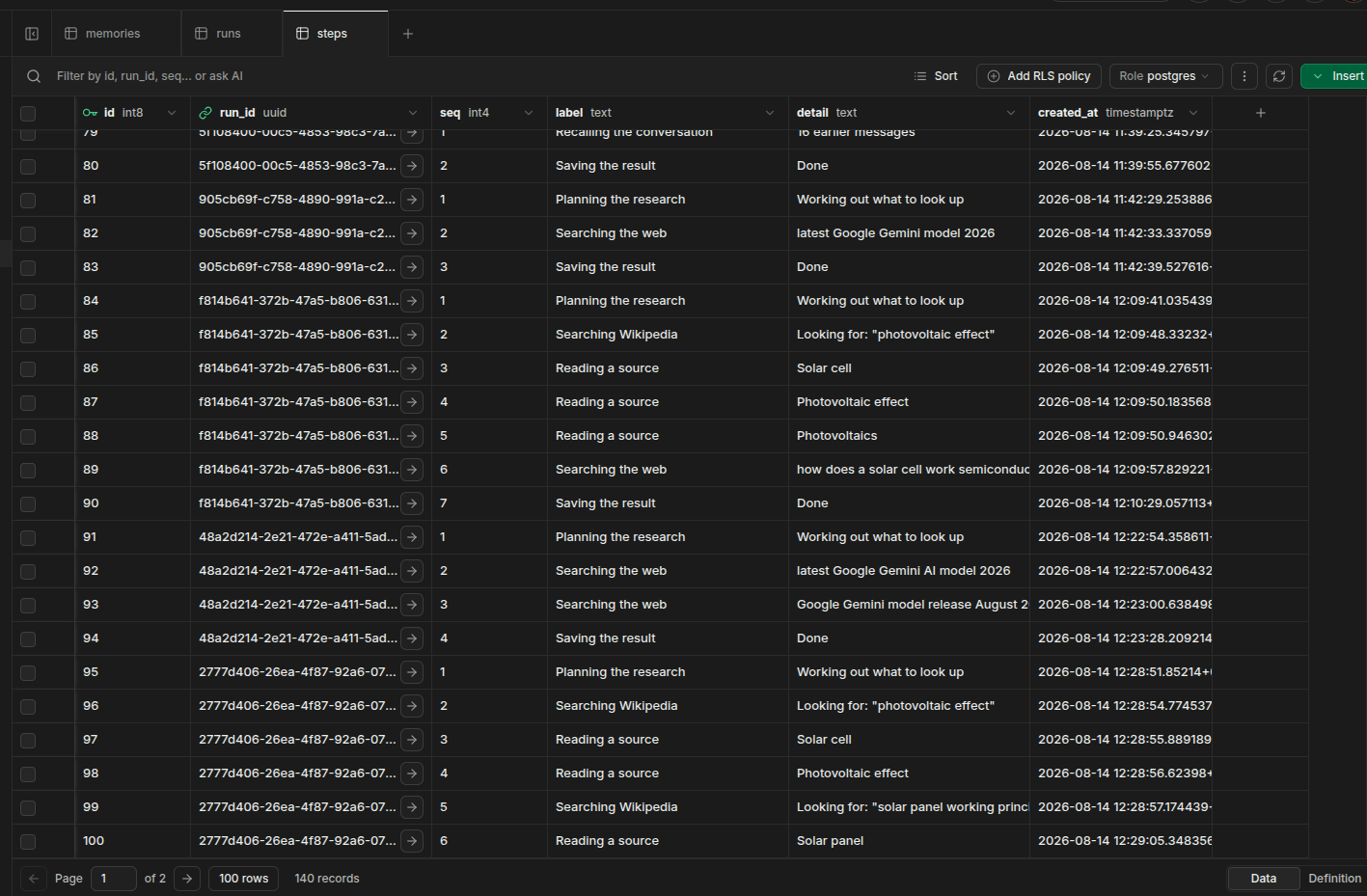
Logging the thought process
await steps.log(
  "Searching the web",
  f'Looking for: "{query}"')
One insert before every phase — before, not after. The
user wants to know what's happening now.
This is also your production debugger. You can't
attach a breakpoint to a deployed agent, but you can read exactly
how far it got.
Switch to the Supabase table editor here and hit refresh during
a live run.
Watching rows appear as the UI updates is the moment it clicks for
people — the "AI magic" is a database table.
Leave it on screen for a beat longer than feels natural.
pgvector in three commands
-- 1. turn it on (already available on Supabase, free)create extension if not exists vector;
-- 2. a table with an embedding columncreate table memories (
id bigserial primary key,
content text,
embedding vector(768)
);
-- 3. find things that MEAN something similar (<=> is cosine distance)select content from memories order by embedding <=> $1limit5;
Keyword search finds the word "car". Vector search finds
"automobile", "vehicle", and
"my old Toyota".
Define embedding in one sentence: "a list of numbers that
represents meaning — similar meanings get similar numbers."
Don't go down the RAG rabbit hole. Say the words, point at the
repo, move on.
The dimension gotcha
vector(768) must match your embedding model's output
size exactly.
Different models output different sizes. Some let you
configure it.
Get it wrong and you either fail at insert time, or build your whole
table on the wrong number and have to migrate it later.
Check your model's output dimensions first, then write the
migration.
Not the other way round.
The single most common reason a student's pgvector project stops
working.
Cheap slide, saves someone two hours. Also warn:
changing embedding model later means re-embedding
everything.
You cannot mix vectors from two models in one table.
An agent is an unpredictable user with database credentials
Row Level Security
Turn RLS on and write no policies — default deny.
Then open only what you need.
Supabase gives you two keys. The
sb_publishable_… key is safe in a browser and
restricted by RLS. The sb_secret_… key
bypasses RLS entirely — server-side only,
forever.
Least privilege
The agent's database role gets INSERT on
steps — and nothing else it doesn't need.
It doesn't need DELETE on runs. So don't
give it DELETE on runs.
The framing in the heading is the takeaway.
You wouldn't hand a stranger your database password because
they seemed helpful.
Practical warning: the secret key in a
.env that gets committed is a full database takeover,
not just a leaked API quota.
If someone's project shows anon /
service_role instead, they're on the legacy keys —
same two roles, older names, valid until end of 2026. Don't let
this derail the room.
Give it a door, not a bulldozer
Don't
execute_sql(query: str)
One confused generation away from DROP TABLE. And you
cannot prompt your way out of this — the model doesn't have to be
malicious, just wrong.
Do
save_note(text: str)
search_notes(query: str)
Narrow functions you wrote, that do exactly one thing, on exactly
the rows they're allowed to touch.
A tool is just a function the agent is allowed to call.
You decide how big that function is.
Same logic as SQL injection, one layer up.
Never build a query out of text you didn't write.
Also mention the step ceiling: cap how many steps an agent may
take, or one loop burns your whole daily quota.
MCP goes both ways
A tool is a function.
MCP is that function, described so a client that has never seen
your code can call it.
We are a server
app.mount("/mcp", mcp_app)
One line, mounted inside the API that was already deploying. Point
Claude Desktop at
your-app.onrender.com/mcp and your Wikipedia tools
show up there. No second service.
Web search we didn't build, from a server we don't run. Wikipedia
is written after the fact — this is how the agent answers
“what happened this week?”
If one program calls one function, MCP buys you nothing.
It earns its place at a boundary — and deployment creates one.
The takeaway is the symmetry:
one app, both ends of the same protocol. Most people only
ever see the server half and conclude MCP is a packaging format.
Point at .filtered(). Tavily's server offers
five tools — search, extract, crawl, map, research. We take one.
Handing a model all five is four more ways to spend credits.
"Narrow tools" from the previous slide, applied to tools you
didn't write.
Worth saying: we wrote no HTTP calls, no response parsing, and
no tool descriptions for the model — their server describes
itself. That's the actual payoff.
Optional in the repo. No TAVILY_API_KEY, no search
tool, and the agent says it can't check current information
instead of inventing it. Check web_search on
/health before demoing this.
Target: minute 58.
If you're past 62, skip straight to the demo — the deck can
wait, the demo can't.
Leave this slide up for a full minute so people at the back can
actually scan it.
Tell anyone falling behind: stop typing and just watch. The
README redoes all of it.
This is two deployments, not one
1 · The agent
app/ — a FastAPI process that keeps running
Must still get CPU after it replies
Render or FastAPI Cloud
2 · The client
client/ — a folder of static files
No process, nothing to time out
Vercel or GitHub Pages
All four are free, no credit card. Only the left-hand column is hard
— a static host cannot get the agent wrong, because it
never runs your code.
This slide exists because people conflate the two and then can't
work out why "deploying" is sometimes trivial and sometimes not.
Land the asymmetry: a static host just serves bytes. The
whole workshop is about the other column.
Agent first — the client needs a backend URL to point at.
1 · The agent, on Render — five steps
Run schema.sql in the Supabase SQL
editor → you now have runs and steps
Push to GitHub. Check that .env is
not in the repo
Render → New Web Service → connect the repo → root
app, build
pip install uv && uv sync --frozen, start
uv run fastapi run main.py --port $PORT
Add your three environment variables in Render's
Environment panel — not in the code
Open /health. Green? You're live.
Then paste your Render URL into the web client and ask it something.
Say every click path out loud — "Render dashboard,
Environment tab, Add Environment Variable" — so people who look up
mid-step can rejoin.
Start the build first, then talk over it. Never watch a
progress bar in silence.
Explain binding to 0.0.0.0: binding to localhost
inside a container means nothing outside can reach you. Classic
first-deploy failure.
deploy/render.yaml does all of step 3 for you via
New + → Blueprint. Mention it, don't demo it.
Same agent, second host: FastAPI Cloud
create app from GitHub→root directory app→live URL
Built by the FastAPI team.
No config file, no build command, no start command —
it reads pyproject.toml, uv.lock and
.python-version and works the rest out.
Environment variables go in the dashboard with a
Secret toggle, then Save and Redeploy.
Prefer the terminal? uv run fastapi deploy from
app/.
Public beta, Hobby is 0.1 vCPU / 512 MB with
scale-to-zero on by default. Deploy to both hosts — nothing in
app/ knows which one it's on, and you get a fallback
URL for demo day.
Optional slide — cut if you're past 65 minutes. The lesson
already landed on the previous slide.
The point isn't "here's another host", it's
the app is the portable part. One file in the whole repo
mentions Render, and FastAPI Cloud needs none.
Honest caveat worth saying: scale-to-zero plus background tasks is
worth measuring — run a job, close the tab, poll a minute
later, see if the steps kept appearing.
2 · The client, on Vercel — two fields
vercel.com/new → import the repo
Root Directory → client — the Vite
project, not the repo root
VITE_API_URL = your backend URL →
Deploy
client/vercel.json is already written, so there is
nothing else to configure. GitHub Pages needs even less — it's already
in the Actions workflow, published at /demo/.
Now wire the two together, or nothing works: VITE_API_URL → the backend URL ·
ALLOWED_ORIGINS → the frontend origin.
Both need a redeploy.
Frame this as the bonus track: the workshop is done once
the agent is live. This just makes it clickable.
Root Directory is the field everyone misses. Point at it
twice.
VITE_* is baked into the bundle at build time
— changing it needs a redeploy, and it is never a place for
a key.
Then set ALLOWED_ORIGINS live and watch "Failed to
fetch" turn into a working page. Best CORS demo there is.
What will go wrong
Symptom
Cause
Fix
"Failed to fetch"
CORS
add your frontend origin to ALLOWED_ORIGINS
First request hangs ~1 min
cold start
hit /health 10 min before any demo
Worked yesterday, dead today
DB paused when idle
resume it — and ping it weekly
429
rate limit
retry with backoff; your own key
404 from the model
model name changed
check what's current, update the env var
allow_origins=["*"] together with
allow_credentials=True is
silently rejected by browsers. Hours have died
here.
Tell them to photograph this slide. It's the one they'll
need at 2am.
Explain CORS once, plainly: "the browser refuses to let a page on
one domain call an API on another unless the API says it's
allowed. It's a browser rule — that's why curl works and your page
doesn't."
The whole session in one line
Never run the agent inside the HTTP request.
Accept the job. Return an ID. Work in the background. Let the client
poll.
Say it, then stay silent for three seconds. Let it be the
last technical thing they hear.
Callback: "the cryptic sentence from slide 3 — does it make sense
now?"
Before you submit — photograph this
.env in .gitignore before your first
commit
Once a key is pushed it's in history forever — rotate it, don't
just delete it
No API key anywhere the browser or the app can read it
Long tasks return an ID immediately — never block the request
Every agent step written to the DB, so the UI can show progress
Errors saved with status = 'error'A silently stuck run looks exactly like a slow one
The agent gets narrow tools, never raw SQL — and a hard step limit
Ping your database weekly — free projects pause when idle
Warm your backend before any demo or judging — cold start is ~a
minute
Test your live URL in an incognito window, and on a phone
Pause here. Actually wait for the phones to come up. This
is the most useful slide in the deck for their submissions.
Long version is in docs/competition-checklist.md in
the repo.